"Amazing — I can see all three monitors and my research paper at the same time. This is completely different from reading glasses. Why didn't anyone tell me about this?"
— Mike, US tech professional, after trying the Shamir Computer lensA Three-Screen Setup That Was Quietly Wrecking His Neck
Mike had everything a productive remote worker could want: a powerful iMac at the center of his desk, flanked by two external monitors — one for communications, one for code or dashboards — plus an iPad he kept nearby for reading research papers. His home office setup was, by any measure, impressive.

Mike's home office setup — impressive on paper, quietly demanding on the neck
It was also quietly wrecking his posture. Mike has presbyopia, so reading the fine print of a research paper up close required one focal distance, while glancing back up at his screens across the desk required another. Rather than the lens finding both for him, he found himself doing the work — leaning in toward the screen, or pulling the page closer, just to get things in focus. By midday, his neck ached. By late afternoon, it was a persistent tension that followed him into dinner and sometimes into sleep. He had adapted to it so gradually that he'd almost stopped noticing — until a business trip to Bangkok gave him a chance to pause and think.

Reading glasses solve the near-distance problem — but leave the screen distance uncorrected
Mike had been wearing progressive lenses for about four years, and they'd served him reasonably well for daily life — clear distance vision for driving, readable near vision for his phone. What he didn't realize is that standard progressives are general-purpose lenses, built to give a workable view of three distances at once: far, arm's-length, and near. The trade-off is that each zone only gets a slice of the lens — the screen-distance band sits high and narrow, near the top, while the eyes naturally settle lower when looking at a monitor. To find a clear screen through that narrow band, the wearer has to tilt their head up and back, which is a fine adjustment for glancing at one laptop but becomes a constant, awkward search across three monitors spanning a wide arc. Sustained for more than a couple of hours, that tilt is exactly what was wearing down Mike's neck and shoulders.

The same problem, through a standard progressive lens — the screen-distance zone is too narrow and sits too high
What he didn't know — what most people wearing progressives don't know — is that there is an entirely different category of lens designed specifically for people who live in front of screens.
"I'd blame the marketing. In more than twenty years in this field, customers have been told progressive lenses give clear vision at every distance — but no one explains that each zone is only a third or a quarter the width of a dedicated pair of glasses. Progressives get sold as universal glasses that can replace computer, reading, and driving glasses. In reality, it's closer to cutting three separate lenses into pieces and stitching them into one."
— Optical X optometristWhen the Right Question Unlocks the Right Answer
Mike walked into Optical X at Riverside Plaza more or less out of curiosity. He was in Bangkok for a few weeks, his prescription had been stable, and he thought he might pick up a spare pair. He wasn't expecting a revelation.
During the consultation, the optometrist asked a question most opticians never think to raise: what exactly was he looking at all day — a laptop, an iPad, a computer screen? Mike described his setup in full: three monitors and an iPad, four to five hours at a stretch, and the neck tension he'd quietly accepted as a cost of the job. The answer was immediate — for someone working entirely across computer screens, progressive lenses were not the right tool. What he needed was one of Shamir's occupational lenses, built specifically for screen distances.
Rather than take that on faith, Mike got to see it for himself. Optical X keeps a library of 60 demo lenses on hand precisely for this reason, and the optometrist had him try the full lineup side by side: his familiar reading glasses, standard progressives, the Shamir Workspace, and the Shamir Computer. Both occupational options work the same way — rather than splitting the lens across far, intermediate, and near zones like a standard progressive, they drop the far-distance zone entirely and dedicate the full width of the lens to close and mid-range work. The only real difference is how far that dedicated zone reaches: the Workspace extends out to about 3 meters, useful for glancing across a room, while the Computer stays tighter, from roughly 40 centimeters to 1.5 meters — pure screen distance, nothing more. Since Mike's day is entirely monitors and documents, with nothing further away than his own desk, the wider Workspace range wasn't doing him any favors. The Computer put all of that width exactly where he needed it, and he found it noticeably more comfortable to look at his monitors through.
Mike tried the Computer demo pair once more, deliberately this time. He looked left at an imaginary monitor. Right at another. Then straight ahead. No head tilt. No searching for the sweet spot. Everything was simply there.
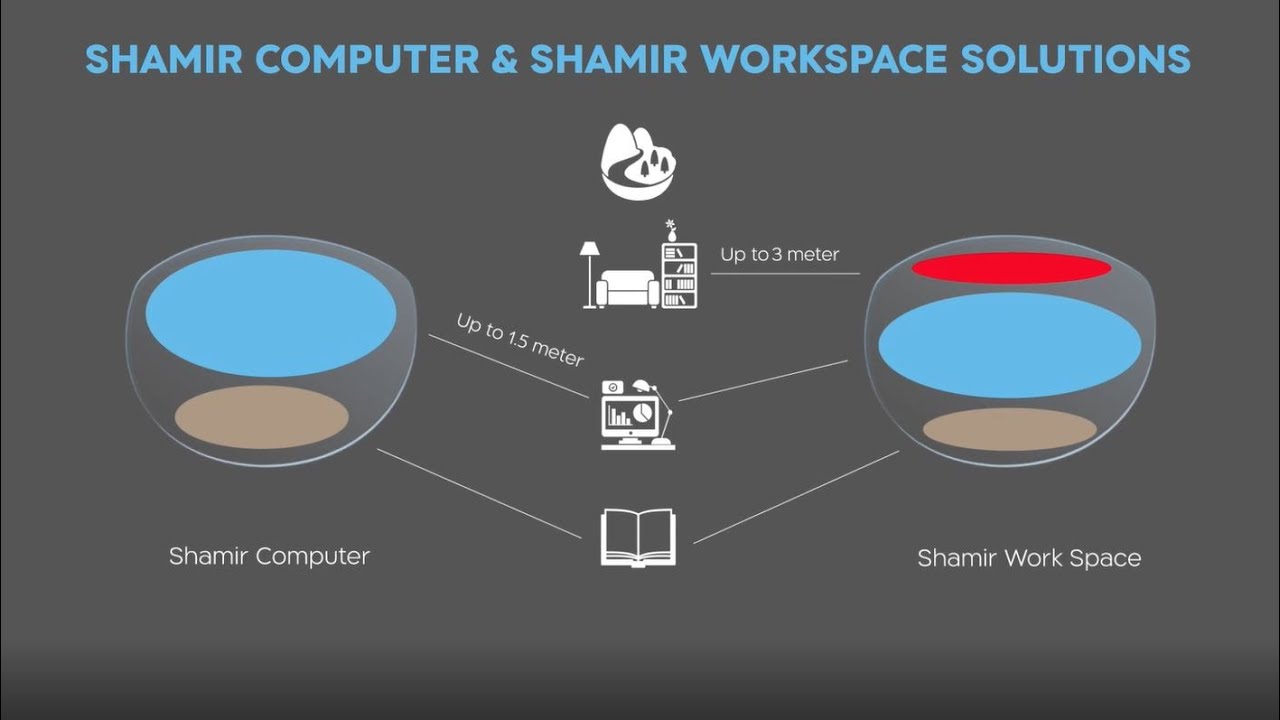
Shamir Computer vs. Shamir Workspace — two occupational lenses built for different working distances
The Shamir Computer is an occupational progressive lens — a specialized category distinct from standard progressives. It is engineered for people whose entire workday happens in front of a screen, with visual demands concentrated between roughly 40 cm and 1.5 meters. Unlike conventional progressives, which must accommodate everything from across a street to a smartphone, the Computer dedicates its full optical width to that close, screen-only range. The result is a dramatically wider, more comfortable zone for multi-monitor workers and anyone doing sustained close-range screen work. Not recommended for driving or extended outdoor use.
vs. Shamir Workspace: same idea, longer reach — about 3 meters instead of 1.5, for anyone who still needs to glance across a room. See "What This Means For You" below for which one fits your setup.
"Why Didn't Anyone Tell Me About This?"
Mike placed his order the same day and picked up his Shamir Computer lenses before flying back home.
The difference was immediate. He could look from his iMac to his left monitor to his right monitor — and down to his iPad — without a single adjustment of his posture. The neck rotation that had become second nature — that unconscious hunting for the right angle — simply stopped. There was nothing to hunt for. The lens met him wherever he looked.

A natural head position at the screen — no tilting, no leaning in
Within a week, the persistent midday tension in his neck was noticeably lighter, though not entirely gone — Mike still logs four to five hours a day at his screens, and Optical X was upfront that no lens replaces the basics of eye care for that kind of workload. The team's advice was simple: take a short break to rest your eyes every hour. Alongside that, he stopped reaching for his old reading glasses — a habit he'd maintained because progressives sometimes required supplementing at close range — and found himself working longer stretches with noticeably less eye fatigue.
His remark afterward summed it up: he was surprised optical stores back home didn't stock demo lenses the way Optical X does, and he appreciated being able to compare the options with his own eyes rather than take a sales pitch at face value. That comparison — reading glasses, progressives, the Workspace, and the Computer, tried side by side — is exactly what let him reach the right answer for himself, and it happened to be the tighter of the two occupational options, not the wider one.
Story consulted with Optical X's Ploychompoo Parsuraphun, Steven Parsuraphun, and Parson Parsuraphun.
The Right Lens for the Right Environment
If you work with multiple screens, spend long hours at a computer, or find yourself tilting and adjusting your head throughout the day to see your monitor clearly — your progressive lenses may simply not be the right tool for the job, for the same reason they weren't right for Mike.
An occupational lens — whether that's the Shamir Computer or the Shamir Workspace — is a specialist lens. Neither is a replacement for your regular progressives; you'd still want those for driving, outdoor activities, and general daily use. Think of it as a dedicated tool for your work environment, in the same way a chef's knife is not the only knife in a professional kitchen but is the one that matters most for the task at hand.
Which of the two depends on how you actually work. If your day looks like Mike's — screens and documents at arm's length, nothing further away than your own desk — the Computer's tighter range will likely feel more comfortable. But if you're leading a team and split your time between a laptop and one extra monitor in a private office or small meeting room, needing to glance up at a colleague or a whiteboard a few meters off, the Workspace's extra reach is probably the better fit.
At Optical X, we approach every consultation by understanding how and where you actually see — not just what your prescription says. Bring your questions. Tell us about your workspace. The right lens is not always the most obvious one.
What Changed for Mike
- All three monitors — and his iPad — visible without tilting his head up
- Chronic midday neck tension noticeably reduced, though still worth managing given his long hours
- Now takes a short eye-rest break every hour, on Optical X's recommendation
- No longer needed a separate pair of reading glasses at his desk
- Longer working sessions with noticeably less eye fatigue
- First time in four years he understood what "the right lens" actually meant